


[Cette partie n'a pas encore été traduite.]
The document window is divided into four sections:
Toolbar
Documents view
Content view
Inspector view
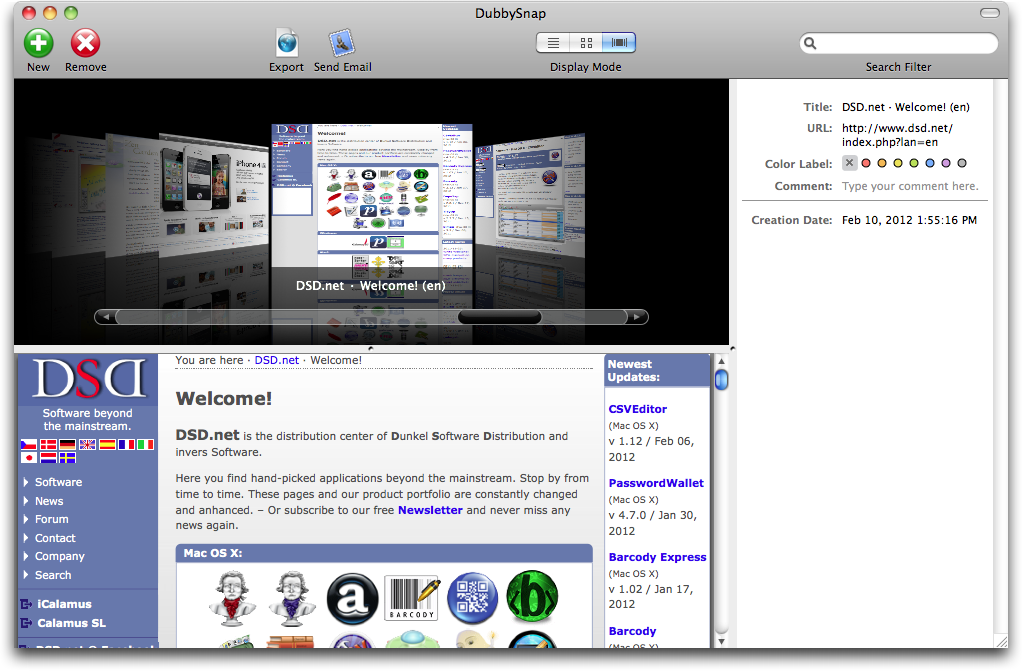
The Toolbar shows all important functions of DubbySnap by default. You can hide the Toolbar, like usual. You can adjust the Toolbar view after a right click into the Toolbar view, or by using the relevant View menu items.
This area shows a list of all currently collected documents URLs. The list can be shown in list mode, item mode, or Cover Flow mode. Change the display mode via the Toolbar or the View menu.
This area shows the current (web) content of the currently selected document URL. Note that clicks into relevant elements inside the content view open your preferred browser with the clicked URL.
Here you find information about the currently selected document URL, such as title, URL, and creation date. You can assign a color label and write a comment for the document.
