


These properties control the visual look of a clip. Any changes made here will only affect the selected Callout, which can only be added to screen recordings.
You must create a Callout Action to use these properties.
The effects you select will be applied for the duration of the callout in the timeline.
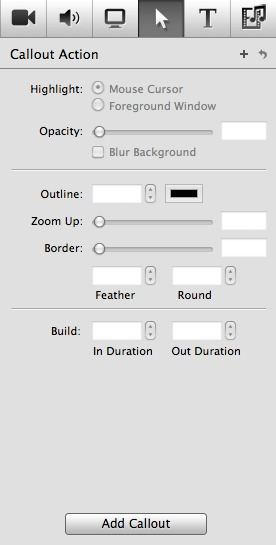
Indicate the object you wish to callout – the Mouse Pointer or the front-most window.
The Foreground window data may not be accurate if the window is in motion, due to latency issues in the Macintosh Window Server.
Set the opacity of the callout.
If checked, the background is blurred in order to make the callout stand out even more.
Controls the size and color of the outline around the edge of the callout area.
You can zoom up the callout to draw more attention to it.
Adds a border around the edge of the callout. This is very useful for the Mouse Pointer highlight, as you can control how much around the Mouse Pointer to highlight.
A feathering effect on the edge of the callout area.
Adds a round-rectangle effect to the corners of the highlight area. This can be useful for the Foreground Window highlight, as some windows have rounded corners.
Using Build In Duration, you can control how long it takes to transition into the callout.
Using Build Out Duration, you can control how long it takes to transition out of the callout.
