


Although ScreenFlow ships with some very common codec presets, it supports any codec that QuickTime provides.
It is beyond the scope of this documentation to describe all of the codec settings. However, here is a brief description of the QuickTime movie settings dialog.
This dialog will be presented when you press the
Customize...
button in the Export Dialog:
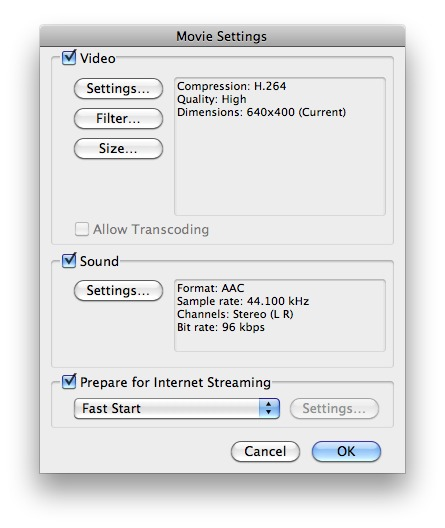
If you want your exported movie to contain any video, then check this checkbox.
Settings...
Pressing this button will allow you to change the video codec and
its various settings. Each codec can have its own very large set of
options, controlling framerate, bitrates, quality, etc.
Filter...
Can be used to add effects such as Sharpen, Sepia, Gamma (Adjust)
and others. Using filters will increase the time it takes for
ScreenFlow to render the final movie.
Size...
Although you can configure the size in the codec itself, we
strongly recommend that you keep the default setting of
Current
. Use the Dimensions:
of the Export Dialog itself
to modify the resulting size of the movie.
Resizing will increase the time it takes for ScreenFlow to render
the final movie.
If you want your exported movie to contain any audible sound, then check this checkbox. Unchecking this box is a very easy way to reduce output size for screencasts without narration.
Settings...
Pressing this button will allow you to change the audio codec and
its various settings. Each codec can have its own very large set of
options, controlling framerate, bitrates, quality, etc.
There are several ways you can export your movie for use on the internet:
Fast Start
Allows your movie to begin playing before the movie has finished
downloading. This is the most common option to use.
Fast Start – Compressed Header
Same as the Fast Start option, but compresses the header of the
file.
Some older versions of QuickTime do not support this option, and
therefore some users may not be able to view this format.
Hinted Streaming
Use this option if the video will be hosted on a QuickTime
Streaming Server (QTSS). This option adds hint tracks
which
allow QTSS to stream the movie.
