


An Audio Action overrides properties found in the Audio Properties panel.
An Audio Action can only be used on clips that contain audio.
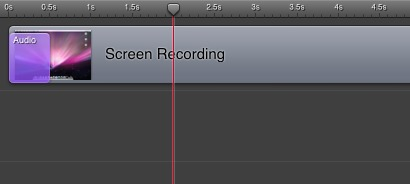
Below is a screen-shot of an audio action on a screen recording clip (note: this is only available if you have recorded your computer’s audio, which is not the case for the built-in tutorial document).
The colored action rectangle starts at time 1.5, and continues until time 2s (2 seconds):
It is best to think of a Audio Action as a marker in your presentation; a place where properties change.
Everything to the left of the Audio Action is the before
state.
Everything to the right of the Audio Action is the after
state.
Everything inside the Audio Action is transition, or ramp
up/down
.
To edit the properties of a Audio action, you must move the Scrubber to the left or right of the Audio Action.
If you move the Scrubber to the right of the audio action, then
change an audio property, you will affect the after
state of
the Action. When the action completes, the value will be what you
configured. You can edit the after
state by moving the Scrubber
anywhere to the right of the clip, as long as the Scrubber is before
any other Audio Action.
If you move the Scrubber to the left of the audio action, then
change an audio property, you will affect the before
state of
the Action. When the action begins, the value will be what you
configured. You can edit the before
state by moving the
Scrubber anywhere to the left of the clip, as long as the Scrubber is
after any other Audio Action.
Using the above screen-shot, we have a Audio Action starting at time 1.5, and finishing at time 2.
If you move the Scrubber to time 2 (as shown) and set the Volume of the Audio Properties to 50%, then play the presentation, the screencast will reduce the volume from 100% to 50% over 0.5 seconds of your presentation, starting at 1.5 seconds into the presentation. Thereafter, the Volume will stay at 50%, unless you add another Audio Action.
Thus, an Audio Action changes the state of your properties (the volume, etc.), while defining the duration of the change.
