


This search is useful when you want to find duplicate images that are in the Aperture database.
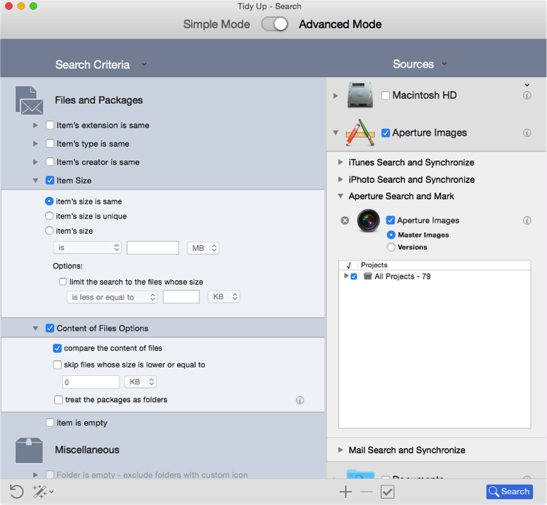
Aperture library.
Files and Packages:
Item’s size:
Item’s size is sameoption.
Content of Files Options:
compare the content of filesoption.
In this example, the entire Master library of Aperture is chosen,
but it is possible to search for Versions and/or choose only specific
projects. The result will contain true
duplicate images. It
doesn’t report any thumbnails, only the full size images.
This search might be long because it doesn’t include any
criteria other than the size and the content. However, since Aperture
completely manages the image files and it may change attributes, it is
necessary to include no other criterion. This method ensures that the
found items are true
duplicates.
When you trash or move an image Tidy Up will assign a keyword to this image.
The keywords assigned are:
Duplicate_Master_to_move
if you have chosen the
move action of the Master Images
option.
Duplicate_Version_to_move
if you have chosen the
move action of the Versions
option.
Duplicate_Master_to_trash
if you have chosen the
trash action of the Master Images
option.
Duplicate_Version_to_trash
if you have chosen
the trash action of the Versions
option.
