


This set of criteria allows you search for particular items that may be wasting disk space.
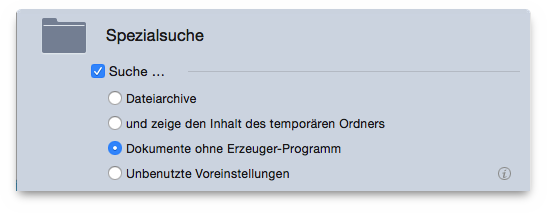
Reports all archive files: zip
, sit
, sitx
,
hqx
, tar
, for example. This option is useful for
eliminating duplicate archives if you include other criteria like same
name, same size, same date modified and created. When this options is
selected, all criteria related to folders, songs, photos and those not
applicable are disabled.
Reports all items that reside in the temporary folders owned by the current user. Temporary folders are those used by an opened application to store temporary data; this data is supposed to be removed when the application closes, but sometimes isn’t. Close all open applications before running this search and removing the found items. When this option is selected, all the other criteria are disabled.
Reports all the document files for which the creator application is not located in the checked location(s). This doesn’t mean that the found items should be eliminated, but only that there isn’t any application in any of the checked locations suitable for opening them. This option is useful when you need to find the files created by applications you have stopped using and have uninstalled. When this option is checked all the other criteria are disabled. Note: It is advisable not to search inside System folders.
Reports the files located in the Preferences
folder of
the current logged-in user whose owner application was not found.
Tidy Up will also report any file that is missing the information
needed to recognize its owner application – for example a
non-preference file or a preference file that is not formatted
according to Apple guidelines. Not all the reported files should be
trashed; you should verify their legitimacy before removing them. When
this option is checked all the other criteria are disabled.
