


This Smart Search contains different searches for files and not,
which help you keep your computer clean. In this Smart Search the
searches are not divided into the two categories Duplicate
and
Similar
because these searches don’t report duplicates.
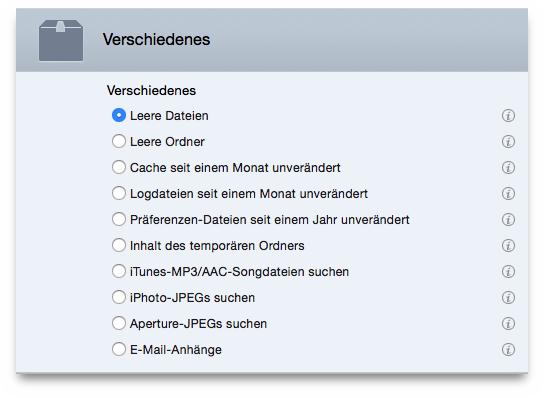
| Empty files | Reports all the empty files. |
| Empty folders | Reports all the empty folders. |
| A month unmodified cache | It is important that you don’t change the checked location that has been automatically chosen. |
| A month unmodified log files | It is important that you don’t change the checked location that has been automatically chosen. |
| A year unmodified preference files | It is important that you don’t change the checked location that has been automatically chosen. |
| Temporary folder’s content | It is important that you don’t change the checked location that has been automatically chosen. |
| Sparse for iTunes’ MP3 and AAC song files | Reports all the songs that are not registered in the iTunes library. |
| Sparse for iPhoto’s JPEG files | Reports all the JPEG images that are not registered in the iPhoto library. |
| Sparse for Aperture’s JPEG files | Reports all the JPEG images that are not registered in the Aperture library. |
| Email attachments | Reports the contents of the attachment folders of a mail application. Tidy Up automatically adds the applications Mail and Eudora. You can manually add the folders of any other mail application. |
